



The short version
PHP2Shell is a pair of critical security flaws in PHP, the software that runs WordPress on your server. The flaws are in PHP itself, so updating WordPress or your plugins won’t fix them. PHP has to be updated on the server, and on most sites that’s your host’s job.
Here’s what to do:
- Check which PHP version your site runs.
- Make sure the fix is installed. Ask your host, or install it yourself if you run your own server.
- Look for signs of a hack, in case someone got in before the fix.
What happened
On 21 October 2026, the PHP team released fixes for two flaws, CVE-2026-109618 and CVE-2026-109619. Both are rated 9.2 out of 10. With either one, anyone can send a specially crafted request to your site and run their own code on your server, without logging in. The researchers who found the flaws showed the attack working on a standard WordPress install.
Details leaked a day before the fix came out, and attacks started that same day. If your server still runs unpatched PHP, it’s exposed right now.
Don’t confuse it with WP2Shell. That’s a different set of flaws in WordPress itself, and a normal WordPress update fixes it. PHP2Shell needs a fix on the server.
What won't protect you
The attack happens inside PHP, before WordPress even loads. So the usual tools can’t stop it:
- WordPress, plugin and theme updates. The flaw isn’t in any of them.
- Security and firewall plugins. They never see the attack.
- Maintenance-mode plugins. The attack gets in before WordPress starts.
- The PHP version menu in cPanel or your host’s dashboard. It switches between PHP versions but doesn’t install the fix. wp-admin has no update button for this either.
A firewall in front of your server, like Cloudflare, can help in the meantime (see “While you wait for the fix”). The only real fix is updated PHP.
Step 1: Check your PHP version
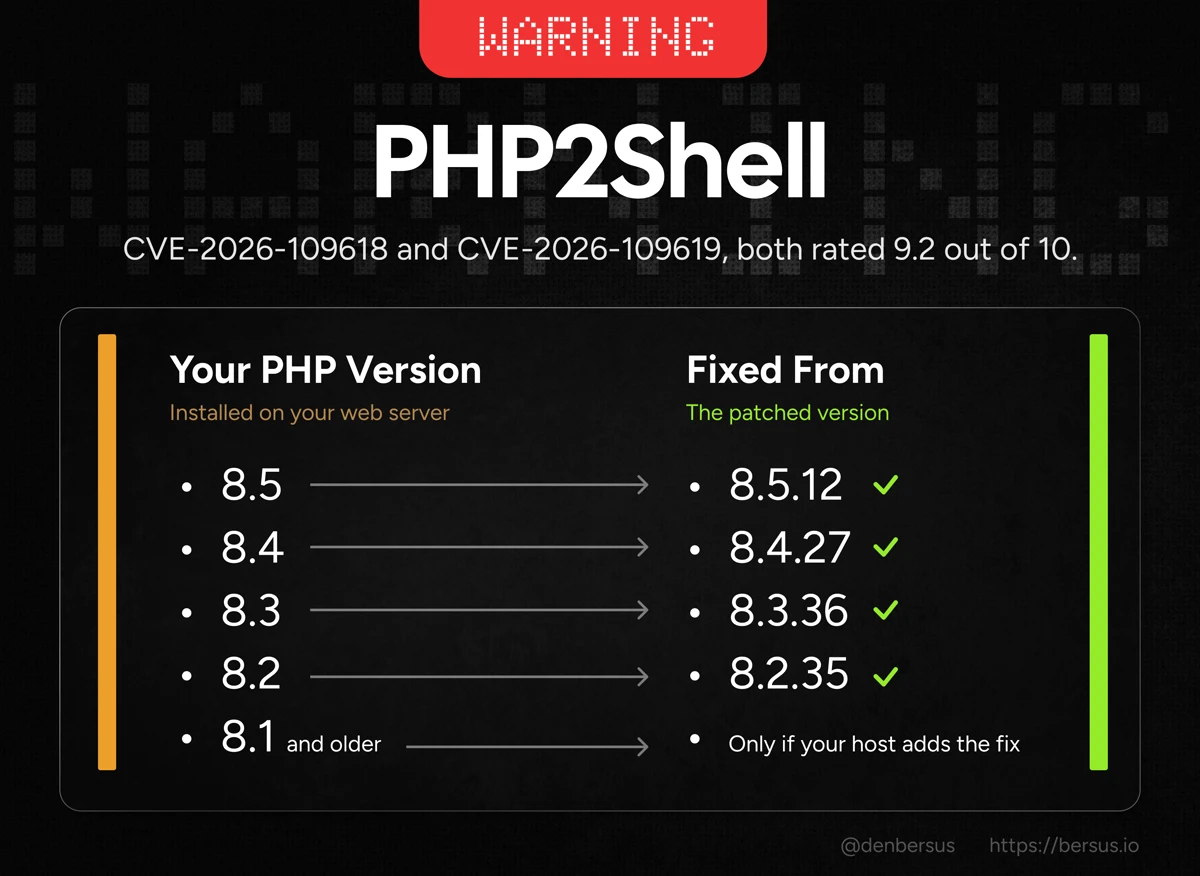
| Your PHP version | Fixed in |
|---|---|
| 8.5 | 8.5.12 or later |
| 8.4 | 8.4.27 or later |
| 8.3 | 8.3.36 or later |
| 8.2 | 8.2.35 or later |
| 8.1 and older | No official release. Only patched builds from your host or Linux distribution. |
A lower number doesn’t always mean you’re exposed. Some hosts and Linux distributions add the fix without changing the version number. Until your host confirms the fix, assume you’re affected.
Step 2: Get the fix installed
Who does this depends on who runs your server.
If your host runs your server
This covers shared hosting, managed WordPress hosting and fully managed services like WordPress.com. Your host installs the fix, and you don’t have to click anything. Most hosts are already rolling out the fix or have temporary protections in place, and many post updates on their status page or blog. Your job is to get a clear confirmation. Feel free to copy this message:
Hi, my site runs PHP [your version]. Has the PHP fix for PHP2Shell (CVE-2026-109618 and CVE-2026-109619) been installed on my server? If not, when will it be? Thanks!
One thing to watch for: “We’ve added firewall protection” is good news, but it doesn’t mean “PHP is updated.” Keep asking until you get that second answer. If your host can’t give you a date at all, it may be time to switch. Our guide to choosing a WordPress host can help.
If you run your own server
This covers a VPS, a cloud server or Docker. If you rent an unmanaged VPS or dedicated server, even from a big hosting company, the fix is usually up to you. If you’re not sure, ask your host.
- Install the fixed PHP packages from your Linux distribution or wherever you get PHP. Fixes are available for:
- cPanel (EasyApache 4, including PHP 7.4, 8.0 and 8.1)
- Plesk on Linux (PHP 8.2 to 8.5; older versions and Windows are still coming)
- Ubuntu, Debian 12 and Debian 13
CloudLinux is rolling out its alt-php builds. Red Hat had no fix yet as of 21 October.
- Restart PHP-FPM or your web server. PHP keeps running the old code until you do.
- On Docker, pull the fixed image and recreate your containers. Pulling the image alone changes nothing.
- Trust your distribution’s security notice, not the version number. Some fixed packages have older-looking numbers. On Ubuntu 24.04, for example, the fixed version is
8.3.6-0ubuntu0.24.04.13.
If you’re on PHP 8.1 or older
Ask your host first. Some hosts and control panels offer fixed builds of PHP 7.4, 8.0 and 8.1. That buys you time, but it isn’t a long-term answer. Plan a move to PHP 8.3 or 8.4, which most hosts let you do from their dashboard:
- Take a backup.
- Update your plugins and themes. If an old one is holding you back, update or replace it first.
- Switch PHP versions.
- Click through your key pages: home, contact form, checkout.
If something breaks, the PHP error log will tell you which plugin caused it. (Our own plugins, including AI Engine, SEO Engine and Media Cleaner, support PHP 8.1 through 8.5, so they won’t hold you back.)
While you wait for the fix
These steps buy you time. None of them replaces the PHP update.
- Put Cloudflare in front of your site. Cloudflare has added PHP2Shell protection to every plan with its firewall turned on, including the free plan. It only protects traffic that actually goes through Cloudflare.
- Ask your host about temporary server settings. PHP’s advisories list settings that block the known attacks, like turning off
session.upload_progress. Only whoever runs the server can change them, and they don’t block every attack. - Keep a recent backup somewhere other than your server.
- Usually, keep your site online. If your host says the fix or temporary protections are in place, you don’t need to go offline. Just keep an eye on things. If you run your own server and can’t patch or protect it at all, taking it offline for a day is a reasonable choice.
Step 3: Check whether you were hacked
Patching closes the hole, but it doesn’t remove anyone who already got in. Attacks started before the fix existed, and attackers often leave a backdoor that keeps working afterward. So this step matters even if your host patched quickly.
What attackers usually do
An attacker who gets in can do anything WordPress can do, and often more. Common moves:
- Create a hidden admin account so they can come back.
- Leave a backdoor file on the server.
- Send your visitors to scam sites, often only visitors from Google or on mobile, so you never see it yourself.
- Add thousands of spam pages that Google indexes under your name.
- Steal your database: customers, emails, orders.
- Add a card skimmer to your shop’s checkout.
- Use your server to send spam or attack other sites, which can get it blocked.
The five-minute check
Most hacks are quiet, so don’t wait for something to look wrong. Go check:
- Users: In wp-admin, filter Users by Administrator. Do you see anyone you don’t know?
- Plugins: Is anything installed that you didn’t install?
- Google: Search
site:yourdomain.comand look for pages you never made, like casino, pharmacy or foreign-language spam. - Search Console: If you use Google Search Console, check Security issues.
- Uploads folder: A
.phpfile inwp-content/uploadsis a red flag. That folder should only hold images and documents. - Your inbox: Look for warning emails from your host about malware, spam or unusually high resource use.
If something looks wrong
Ask your host to scan the server and restore a backup from before the problem started. Then change all your passwords (WordPress, hosting and database), because the attacker may have seen them.
Managing a lot of sites?
Sources: the official PHP announcement, PHP’s advisories for CVE-2026-109618 and CVE-2026-109619, and Cloudflare’s report.

Fractional Head of Digital & Creative Director
Den builds comprehensive digital growth systems for tech companies, ecommerce, gamedev and startups. With 5+ years in C-level roles overseeing $7.8B in transactions and leading teams of 860+ people, backed by 28+ years of technical experience, he combines executive leadership with hands on expertise in design, development, AI, and marketing. His work has been recognized with industry design awards and federal medals.

